
Spectrum Analyzer not being displayed!

jerseymods

Member
:
2003.5 Titanium Grey MSP
On the stock kenwood head unit the spectrum analyzer is not being displayed even when it is set to be displayed in the menu settings. Is there a connection I should check? I already tried resetting the unit. I'm providing a picture for further help if necessary.
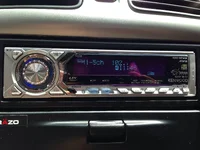
 

Attachments

  • image.webp
    image.webp
    574.9 KB · Views: 341
You probably have the settings wrong unless the display is crapping out. there are the different display modes A, B, & C and they will vary what is shown on the display.
 
its a 10+ year old headunit. honestly i wouldnt be surprised if its crapping out.

Yeah That's what I did not want to be the case. Its 10yrs old but the car has only 27k miles so the stereo was not being used that often. I know its electrical and electronics can go whenever, but that would be a bummer. Everything on the unit itself is functioning correctly besides the spectrum analyzer.
 
Yeah That's what I did not want to be the case. Its 10yrs old but the car has only 27k miles so the stereo was not being used that often. I know its electrical and electronics can go whenever, but that would be a bummer. Everything on the unit itself is functioning correctly besides the spectrum analyzer.

If everything else works fine it would seem unlikely that the screen is the problem. What happens when you try to display the analyzer in the location where you have the icon now?
 
If everything else works fine it would seem unlikely that the screen is the problem. What happens when you try to display the analyzer in the location where you have the icon now?

The spectrum analyzer does not display in that setup either.
 
But the icon works? If so, I'd say the screen is fine and the problem is something else.

Yeah the icon is displayed. And that's what I'm thinking. The screen seems to be working fine. I'm not sure if there is a connection that might be loose or something that is strictly dedicated to displayed the analyzer. I haven't even messed with the head unit at all. I and really stuck here with this issue.
 
Yeah the icon is displayed. And that's what I'm thinking. The screen seems to be working fine. I'm not sure if there is a connection that might be loose or something that is strictly dedicated to displayed the analyzer. I haven't even messed with the head unit at all. I and really stuck here with this issue.

All I can say then is that if you are 100% confident you have the settings right (not all display modes show the analyzer) then whatever the problem happens to be it isn't going to be worth fixing. Sorry...
 
All I can say then is that if you are 100% confident you have the settings right (not all display modes show the analyzer) then whatever the problem happens to be it isn't going to be worth fixing. Sorry...

so in the long run, its just better to replace the head unit then.
 
so in the long run, its just better to replace the head unit then.

yes sir. i had my original headunit in my car for about 2 years after i bought my car until the gears that made it flip up crapped out. i didnt want to tinker with it. bought a new sony headunit for $100 and install took about 20-25 minutes.
 
yes sir. i had my original headunit in my car for about 2 years after i bought my car until the gears that made it flip up crapped out. i didnt want to tinker with it. bought a new sony headunit for $100 and install took about 20-25 minutes.

Sweet. I was always thinking about upgrading anyways, so now i have a reason too lol. I think i might go with a kenwood unit just to keep it with same branding.

BTW did you have to purchase a new wiring harness with the new headunit?
 
Sweet. I was always thinking about upgrading anyways, so now i have a reason too lol. I think i might go with a kenwood unit just to keep it with same branding.

BTW did you have to purchase a new wiring harness with the new headunit?

nope. used the original harness. you can check and ask the people there if the headunit is compatible with your factory harness.
 
nope. used the original harness. you can check and ask the people there if the headunit is compatible with your factory harness.

Okay, what I kind of figured is that Mazda already had a wiring harness already hooked up since they did install a aftermarket stereo system into the protege, making it seem like its already stock internally. Is this incorrect?
 
no problem. plus u can always pull your radio out and check. takes like 5-10 minutes to pull it. just take the surroundinf cover off the radio and then pull the radio straigh out. needs a little bit of force since the rubber groumet keeps it in place in the back of the original headunit
 
no problem. plus u can always pull your radio out and check. takes like 5-10 minutes to pull it. just take the surroundinf cover off the radio and then pull the radio straigh out. needs a little bit of force since the rubber groumet keeps it in place in the back of the original headunit

I dont need to use the "butter knife" method to slide unit out?
 
any kenwood unit will plug right into the harness. they haven't changed plugs in 10+ years
 

New Threads and Articles

Back