Microtech install questions

Jas00x

Member
:
2000 Mazda Protege ES
I finally received my Microtech LT-10s and I've looked over the install documents and collected all my necessary parts and pieces for installation. The directions are Protege Specific and well written. I'm certainly not a Electrical engineer, and the install definately looks like something I can do.
I just have a few questions for those of you who have already have a microtech installed and running. I have shot Steve at NSN most of these questions, but I figure he's probably out for the holiday.

1) What's up with the software? I did not get a CD to install on my laptop. In the install manual it says it may be preinstalled to the ECU itself and that there should be a label on the bottom of the ECU. I have no label or marking on the bottom of the ECU. Also, will the software run on Windows XP? In the manual it only goes up to Windows 2000.

2) Connecting from ECU to Laptop. It came with a serial port dongle. Does it matter if the dongle is attached to the laptop or the ECU? Fortunately, I have a serial port on my work laptop so I got a serial cable to hook it up. However I know alot of new computers (the one I plan I getting for personal use) do not. Can you use a Serial port to USB adapter to connect?

3) Resistors. It says you need one 1K-1.5K Ohm resistor for the air intake temperature sensor. Not familiar with these products, they are available in different wattage ratings (from 1/8w up to 10w). I just bought the 1w 1.5K Ohm resistor. Should that be OK?

4) Resistors part two. It mentions the need for a 100 Ohm resistor in the "required tools and parts" section. For this I bought a 1w 100 Ohm resistor- is this OK? I assume this is for the IAC valve, as it mentions a need for a diode in the setup but doesn't specify. Does that sound right?

5) Auxillary hook-ups. What auxillary items are required or highly recommended for the auxillary items (VICS, IAC, 02 sensor). It looks like there is only one hookup for an 02 sensor. Should this be for the wideband or narrowband? Is there a way to hook up two 02 sensors (or is that completely unnecessary? I'd like to have the wideband hook up for datalogging purposes.

6) Type of system. Judging by the sensors it has you hooking up, I assume that the Microtech uses the "Speed Density" model as opposed to the "Mass Air Flow" model. Is that correct? Just want to be sure I am applying the right methods that I have been reading about!

As a side note, my kit did come with a new water temperature sensor and Brass "T" fitting and detailed installation notes. I think a few of you mentioned the need for a water temp sensor in my "micotech prep" thread. It's included with the kit now!

Thanks in advance!
 
Last edited:
1. You can download the Microtech software from www.microtechefi.com
2. The laptop adapter has to be plugged into the Microtech, and you can use a usb to serial adapter.
3. The resistor you have is the same one I got so you should be fine.
4. I did not use this resistor and for the installation directions never required me to do so.
5. The lt10 has a specific wire for wideband logging(not sure of colors), and you can hook up a 1-5v wire from you wideband to this. The rest of the aux can be used for things such as two-step launch control or flat shifting. Kicker22705 has a thread on this.
6. The Microtech has a MAP sensor and it uses that to judge vacuum and boost. You will hook up a vacuum line to the microtech. It also uses the TPS to see the throttle response.

As far as the water temp and t-fitting my came with it and just follow the directions for that part.

Good luck with the install.
 
Thanks for the response and the link for the software.
The install is going pretty well. So far, I'm halfway through the injector wiring. Interesting to point out that on the injectors for the 1.8L, the pins are the same, but the wire colors are different than the manual says. I figured I'd run into that at some point. I was certain to get a 1.8L wiring diagram before I started just incase something like that popped up.

Where are you guys mounting the MT ECU? I was planning on mounting it in the glove compartment.

Anyways, so far so good. I'm really taking my time, but my soldering is getting better and I think I may be able to have the wiring complete by tomorrow.
 
Where else could you feasibly put it..I mean its small..but the area under the dash is pretty tight...and you would want access to it.
 
In the center console under the cup holder is a good spot. Leave some slack on the wiring and pop off the cup holder to access it. Just an idea...I used to have my J&S in that location, fit perfect. Is the microtech about the same size?
 
Last edited:
Oh yes...That is a better place...Good idea man.

I forgot about all the space under there....And if your good...Just put a connector up in your ash tray for Com access....(evil)
 
Well, I got all the wiring in there today and plugged the ECU's in to begin the ECU setup. With ignition in the ON position, I was getting the Orange light and the Green light on the MT. It says this light is a TPS calibration check, so I assume this is normal or OK.
I figured it was a good time for a break so I can get my laptop all setup with the software. Tommorow, I'll try to finish the rest of the ECU setup and get the engine started!
I still have some other things to do like cleaning up the wiring, and mounting the MT ECU, but I figure that can wait untill I get the engine running. My plan for the MT mount is going to be in the glove box. I'm working on building a little shelf in the middle on the left side to mount it, so the bottom of the box is still functional.
I'm a little dissapointed with my wiring for the injectors. I was thinking quickest route- up the passenger side of the engine and across. However, after getting them installed, I realized that it would have been better to follow the main wiring harness and run the wires across the firewall to the driver's side and then across. For now it should be fine, but I have a feeling I may run into some funny business if I ever have to remove the engine. All my other wires I was able to follow along the harness and should clean up pretty well.
As for auxilary items, I haven't set any of those up. I don't have AC, so I don't need to worry about that. Do you guys recommend setting up the IAC or VICS? I'm planning to hook up the wideband 02 sensor, but figure I can wait a little on that since its not critical to get teh car runnning.
 
Where are you guys mounting the MT ECU? I was planning on mounting it in the glove compartment.

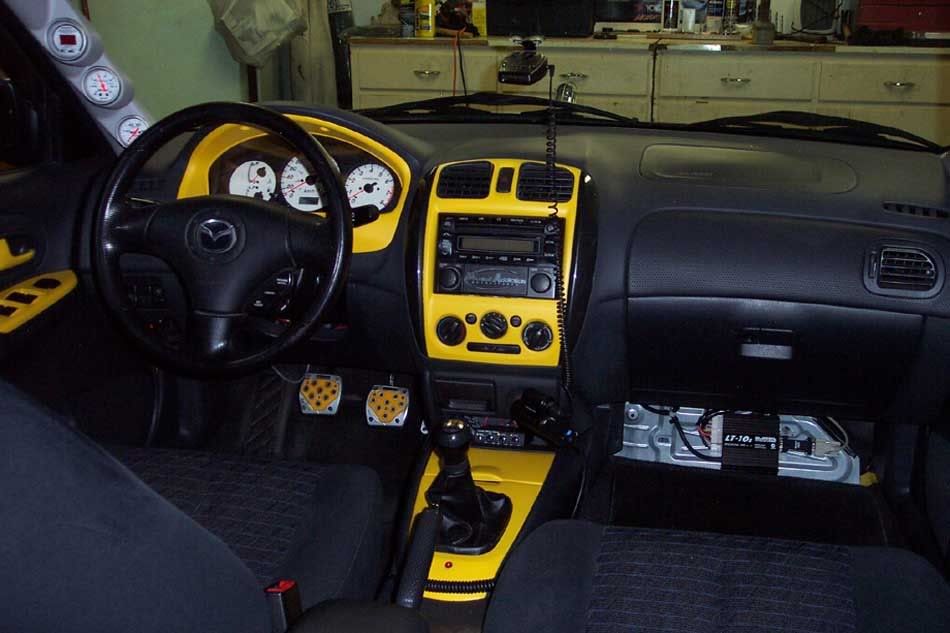
Here's where mine went. Until I make a cover plate, it stays uncovered so passengers know where NOT to put their feet. :D

InteriorShot.jpg
 
Hooked up the laptop today and tried to start the car. The engine starts to crank, but does not actually run.
I get a message in the display area that flashes "miss 2.1b" and "280". I can't seem to find any explaination of this. Can I run some sort of diagnostic to check to see if everything looks to be wired up OK?
 
You can mount the microtech behind the glovebox. . .that is where I put mine - that way it didn't use up glovebox space and was still easily accessible - just drop the glovebox down.

And if the boost bug really gets you, I have a brand new set of 550cc injectors that will work lovely with the MT and put you well over the top.

Unfortunately, I don't know what the flashing "errors" are though and I don't believe there is a diagnostic mode that would do what you're asking. I'd check it all over again - it is pretty important that everything is soldered in real well.
 
Steve would be the best person to contact since he sells and does pretty much everything microtech related. I never saw those errors, but there is a screen in microtech that will allow it to do a self test, but I think that is only for the injectors and ignition.
 
i would imagine Little Beavis knows quite a bit about about the microtech as well, being his brother and all..
 
I wanna say that mine says something about miss 2.1b or something similar.

You probably need more fuel... have you tried cranking up the mixtrm? It took me a while to get mine started the first time. First just cranks. Then a little bit more. Then it'd almost idle and die out. Finally, it fired and held, the beautiful sound of a 3" open downpipe making me even happier :D
 
found out that the "miss b2.1- 280" is the map name. All the sensors seem to be working properly. After reading through the cold start docs that steve sent, I need to start messing with the MixTrm. I think I've got it too rich right now. so my plan for tomorrow will be to try turning the MixTrm down/up and see what happens.
My main problem is finding time to get out to work on the car! Work has been keeping me late the last few days. I just need to get out and have enough time to mess around with the car a little before 10pm. I don't think my neighbors will appriciate the open exhaust as much as I do. :)
 
just a word of advice make sure you let the starter rest a bit between multiple cranks. The last thing you want to do it replace the starter.
 
I have ran into 2 batteries in 4 hours trying to start the engine testing different settings before. Problem gets worse as you start to foul out the plugs because even with a good tune, it may not start and make you think its the tunning.
At the end, the engine has a temp of 10-15 deg more and you are already on another compensation setting.

Try not to touch the crank map settings for now, use the MixTrim to start the car, look at the injector open time and then adjust.
 
GOT IT STARTED TODAY!!!
I just cranked up the MixTrm 5% and it fired right up on the second try. I did have to grab a spare battery to jump it to get enough volts after trying a few starts over the last few days. I just let it idle for about 10 minutes and that was that. now I can confidently go in and clean up my wiring, setup the wideband 02, and get everything mounted back into place.
I do have one question. Durring my idle run, the cooling fan never came on. Does this need to be wired up to the MT to work? I got the car up to normal operating temp, so I expected the fan would kick on.
 
Congrats on getting it started! It is such a good feeling :D

Hmm... I do recall splicing my fan into the Microtech wiring. In the Microtech dash, there is a setting for the temperature that the fan comes on. Try setting that pretty low (below whatever normal coolant is) and see if it comes on then.

I know you don't have A/C, but do you have the A/C fan? I wired a switch for my slimline fan I put in place of the A/C fan. You might not need it as much since you aren't turbo.
 
Yes it certainly is a good feeling to fire it up! :)
Sounds like a good idea to get the fan wired in. I'll add that to my list of things to do. I took out the AC fan when I removed the AC and with the AWR header, there isn't much room for the fan, now. I should be fine with just one fan.
 
Back