2016~2023 Transmission Fluid Temperature

I’m planning on changing my ATF and I can’t seem to find the transmission fluid temperature on my obd2 bluetooth elm327. I’m using “car scanner” app on android. I tried inputting one of the custom PIDs that was on a shared spreadsheet here to no avail. Hoping to get an assistance. Thank you

 
Thread 'Scan Gauge II - X-Gauge Code - Transmission Fluid Temperature'
Scan Gauge II - X-Gauge Code - Transmission Fluid Temperature

This worked for me on my Scangauge for my ‘23 CX-5. Not sure if it’s helpful for your scanner and model but figured it was worth a try.

Edit: dug a little deeper, sorry it’s likely not helpful. There might be a way to convert the x-gauge parameters to PID but that may not be feasible.
 
Last edited:
Upvote 0
I threw those x-gauge parameters into Google Gemini and here’s what it spit out when I said to convert to PID:

Based on the codes you provided, you are looking at a Transmission Fluid Temperature gauge, likely for a Toyota or Lexus vehicle.

Here is the breakdown of those values converted into a format compatible with standard OBD-II scanners (like Torque Pro, OBD Fusion, or Car Scanner ELM OBD2):


The Translation

• Header: 7E1 (This targets the Transmission Control Module specifically).
• Mode & PID: 221E1C
• Metric Formula: ((A \times 256) + B) / 80
• Imperial Formula (Fahrenheit): (((A \times 256) + B) / 80) \times 1.8 + 32

Detailed Component Breakdown (see attached screenshot)

How to enter this in your tool:

If you are using an app like Torque Pro, you would set it up as a "Custom PID" with these settings:

• OBD2 Mode/PID: 221E1C
• Long Name: Transmission Fluid Temperature
• Short Name: ATF Temp
• Minimum Value: -40
• Maximum Value: 300
• Scale Factor: x1
• Unit Type: °F (or °C)
• Equation: ((A*256)+B)/80*1.8+32 (for Fahrenheit)
• OBD Header: 7E1
 

Attachments

  • IMG_1308.webp
    IMG_1308.webp
    49.2 KB · Views: 4
Upvote 0
I’m planning on changing my ATF and I can’t seem to find the transmission fluid temperature on my obd2 bluetooth elm327. I’m using “car scanner” app on android. I tried inputting one of the custom PIDs that was on a shared spreadsheet here to no avail. Hoping to get an assistance. Thank you

Hi, does your Car Scanner app have the icon with the white engine on a blue background? If so, I used the same app with my ELM327 bluetooth adapter. No need for a custom PID, I just went to the Dashboard, click twice on any area, then choose Customize. Where it says Sensor:, I picked ATF temperature. Then pressed Back in the top left and there's now a space on the dashboard showing the current ATF temp.

I did this to drain and fill ATF on my 2022 CX-9. I don't even have the Pro version, pretty sure the app I have is just the free one.
 
Upvote 0
Please remember to report back :) 🙏🏻
No dice :(
Hi, does your Car Scanner app have the icon with the white engine on a blue background? If so, I used the same app with my ELM327 bluetooth adapter. No need for a custom PID, I just went to the Dashboard, click twice on any area, then choose Customize. Where it says Sensor:, I picked ATF temperature. Then pressed Back in the top left and there's now a space on the dashboard showing the current ATF temp.

I did this to drain and fill ATF on my 2022 CX-9. I don't even have the Pro version, pretty sure the app I have is just the free one.
did you click sensor or which value it overrides? I do not see atf temperature in the sensor category, only in the override value
 
Upvote 0
18182.webp


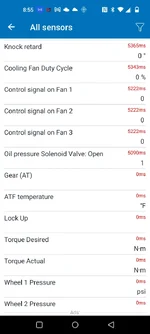
Tap where it says "ATF temperature" in blue, then scroll all the way down. From the bottom, scroll up a bit to find ATF temperature, between "Gear (AT)" and "Lock Up"

18183.webp
 
Upvote 0
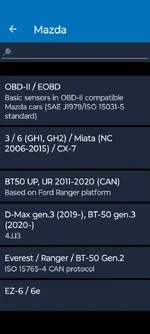
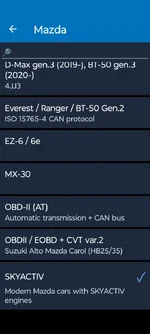
Settings -> Connection Profile -> Mazda -> Skyactiv

Works for a 2017 CX-3.
 

Attachments

  • Screenshot_20260302-142415.webp
    Screenshot_20260302-142415.webp
    37.8 KB · Views: 5
  • Screenshot_20260302-142403.webp
    Screenshot_20260302-142403.webp
    33.9 KB · Views: 4
Upvote 0
I dont see it on mine. It might be the type of obd2 bluetooth i have is not picking it up
These profiles are part of the app-settings. If there are sensors not supported by the device, it'd tell you so or display no values when connected. 😬

Two of my obdii devices work with this app, one purchased in 2021 and the other 2025. The app works on my Android 13, 12, 11 and 8. (Tried to run the old phones as dedicated obd monitors.)
 
Upvote 0
or Maybe 2019 cx-9 just don’t have one 🤣. Might just stick a cooking temp probe in the dipstick lol
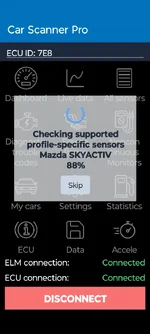
Try again with the ignition on! I was messing around with the dashboard items and lost my coolant temp (B) somehow. Had to turn the car on (engine still off) so the app can talk to the ECU. 😅

For my car, coolant temp A is temp on the engine side, coolant temp B is on the radiator side. I need to know both.
 

Attachments

  • Screenshot_20260302-152439.webp
    Screenshot_20260302-152439.webp
    39.3 KB · Views: 3
Last edited:
Upvote 0
Does having jb4 have any effect? I have it in default / map 0.

I don't think so. I have a JB4 installed as well, also currently set to Map0, but it shouldn't have any effect. The OBD2 JB4 connector would be unplugged while the Bluetooth ELM327 OBD2 module is connected.
 
Upvote 0
Back