32'' Monitor Help/? (Computer monitor)

ForceFed

Member
:
Trailblazer SS AWD ....Still a Mazda Junkie Though.
I just picked up a 32'' Mitsubishi Computer monitor model XC-3315C (old/'92) and I want to try to find out some info on this.
I figured that some of you computer guru's on here could help.

I want to use it as a supplemental monitor in my Computer room. I want it to display exactly what my smaller PC monitor is showing. I am doling this because I hate when two people are in a room and the other is always looking over your shoulder to watch things.This way. the other person in my Computer room can sit back on the couch and watch whats going on without moving or breathing on the back of my neck.
This thing has a TON of connections on it and I am not sure what I need to get it hooked up. I also need something to split my monitor signal or does this monitor have a monitor output that a secondary monitor can be hooked up somehow.
Any help and info on this thing would be appreciated.
I wonder what the resolution on this thing is as well...It looked really good when I tested it out before I bought it and even a D...VD playing in the guys laptop looked good.

Help me out with info guys and I'll try to get some pics of this thing.

Hope these pics help!
monitor_small.jpg

back_small.jpg
 
Ha, where di you get that? That's an old NTSC monitor. When I say "monitor" I mean that it was used to monitor video output for color and value reference. I think the res on that is probably only 800x600 max. It might be even as low as 640x480 (lower NTSC res). You can probably output a higher res to it, but it will scale it back down. That would work great for mirroring video (DVD, video files, etc.) or for mirroring games.
 
Spooled said:
Ha, where di you get that? That's an old NTSC monitor. When I say "monitor" I mean that it was used to monitor video output for color and value reference. I think the res on that is probably only 800x600 max. It might be even as low as 640x480 (lower NTSC res). You can probably output a higher res to it, but it will scale it back down. That would ...work great for mirroring video (...DVD, video files, etc.) or for mirroring games.
I just picked them up loally...I got two. I never unnderstand the resolution thing either....The info I found says its 800 by 600....What does that mean exactly....I'm not sure what i just bought...LOL!
I was wondering what video will look like and will it be possible to hook up my x-box to this so I can play Halo on it instead of on my big screen in the living room.
I'm also not sure what to use to hook it up...my goal is to have this and my 19'' monitor show the same thing.
I also just found these being sold used for $1000+....I picked up two for a TON less than that!
 
Spooled said:
Ha, where di you get that? That's an old NTSC monitor. When I say "monitor" I mean that it was used to monitor video output for color and value reference. I think the res on that is probably only 800x600 max. It might be even as low as 640x480 (lower NTSC res). You can probably output a higher res to it, but it will scale it back down. That would ...work great for mirroring video (...DVD, video files, etc.) or for mirroring games.
Will it work good for watching DVD's or playing a game?
What do you mean "mirroring" ?
And when you say for color and value "REFERENCE"...what is that.
I am just trying to learn here as well.
I did see that this has a standard RCA video input as well as an S-video input....I guess I can hook my x-box to it and see what happens.
 
ForceFed said:
Will it work good for watching DVD's or playing a game?
What do you mean "mirroring" ?
And when you say for color and value "REFERENCE"...what is that.
I am just trying to learn here as well.
I did see that this has a standard RCA video input as well as an S-video input....I guess I can hook my x-box to it and see what happens.


It's going to be more sharp than a regular TV, but less than a newer HDTV. If you just want to play Gamecube or XBOX on it, that's fine. If you want to have your computer's display on that monitor (like, across the room) you can mirror the image onto it. I'd use it as my new TVPC's screen and ditch this crummy TV I have that's about the same size.
 
Mirroring is a function of your graphics card. Most nVidia cards will let you mirror what is on your monitor through s-video. It would be good for people that want to watch what you are playing, but not for the person playing. It will be hard to read text on that 32". You can also setup your graphics card (if it supports it) to mirror the hardware video overlay on the external monitor. It will basically put whatever is playing in Windows Media Player on the 32" as a standard video signal.

It should work GREAT for XBox, though. The image will be very clear compared to a normal TV and the colors should be spot-on.
 
Oh, and reference is just a term used to describe a monitor that represents the ideal viewing situation. The colors should be perfect if it's setup correctly.
 
I paid $50 each for these...They are not the prettiest but I am going to take the rear panel off and paint it satin black...It'll look good then. I am still lost on the mirroring thing?

I told you what I want to do....Now how do I do it?
The text is awesome BTW....I have already seen it and its pretty damn clear!
Why would this not be good for using as a monitor if I was viewing it....I was alos planning on buying a wireless keyboard and mouse so I can sit back on my couch and type and play on the net...Tell me more!
 
Your PC need a video card that will support multiple monitors.

Right click on desktop and click properties. And then go to settings.
Under display there might be a option for multiple monitirs.

You may need to update to the latest driver for the laptop.
 
EcLites said:
Your PC need a video card that will support multiple monitors.

Right click on desktop and click properties. And then go to settings.
Under display there might be a option for multiple monitirs.

You may need to update to the latest driver for the laptop.
It won't be getting used for my laptop...but rather for my PC in my computer room...I have both. How do I check for what I need?
 
I built a PC just for downloads and watching stuff on my TV, and a screen like that is PERFECT. You got a good deal.
 
pluto316 said:
I built a PC just for downloads and watching stuff on my TV, and a screen like that is PERFECT. You got a good deal.
Good to know!
Yeah, after picking these up and doing some searching today....It REALLY looks like I stole the things!
They have all kinds of inputs and settings through the Monitor now...Kinda like TV inputs....Now I just got to figure out what these things can do!
 
You're going to need a 5 BNC to VGA cable to input to it from your video card, unless you have composite or S-video out from your video card....(this reminds me of this old NEC monitor we had at the utility I used to work at).

Display info:
http://www.monitorworld.com/Monitors/mitsubishi/xc3315.html

BNC info:
http://www.monitorworld.com/Cables/Bnc_page.html

Cable you'll need:
http://www.monitorworld.com/Cables/hd15male_to_5bncmale.html

I used to have a 21" SGI monitor which I bought for $40 a few years ago (freakin mint too; went up to 1600x1200 without flinching), but the 13w3<-> connector was a b**** to setup.

Good find.
 
Thanks...And after doing some research it looks like I need a dual output video card...Show me these guys.

I would like one to show exactly what on the monitor as well as whet they talked about before with meadia player being displayed on the larger monitor rather than the smaller one.
 
Uh, the one I use is an old Radion. You just need to have a video out and a VGA out.

My setup displays to an LCD monitor and a TV with the same image on both. I only use the LCD monitor when I want to do setup stuff that requires me to read the text on the screen. For everything else I just leave it unhooked and use my TV as the main display.
 
You can get a pretty cheap PCI Radeon based card with S-Video (get a composite adapter, or should be included) just to drive that monitor. Else, just about any decent ATI or nVidia based card.
 
I just had a buddy build this computer not long ago..How do I find out if the video card in there already will work. And also, How do you set up for Media player to display on the larger monitor only....That would be cool. And as far as the S-Vid input on the monitor..I was going to use that input for my x-box....How else can I hook up the computer ans the x-box without having the swap out plugs when I want to use each....?
 
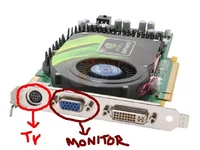
Most older cards look like this if they weren't the low-end model. S-video / VGA out. Hook the blue part to your monitor, and the round black part to your new TV. Simple as that. You can get the cables you need from Best Buy for cheap (well S-Video cables are kinda expensive actually).

I use a home theater reciever which has multiple inputs for my PS2, Computer, GameCube, etc. You can go to Game Stop and get a switch box (I am sure Best Buy has them too) to switch between inputs.
 

Attachments

  • ohyeah.webp
    ohyeah.webp
    26.4 KB · Views: 120

New Threads and Articles

Back