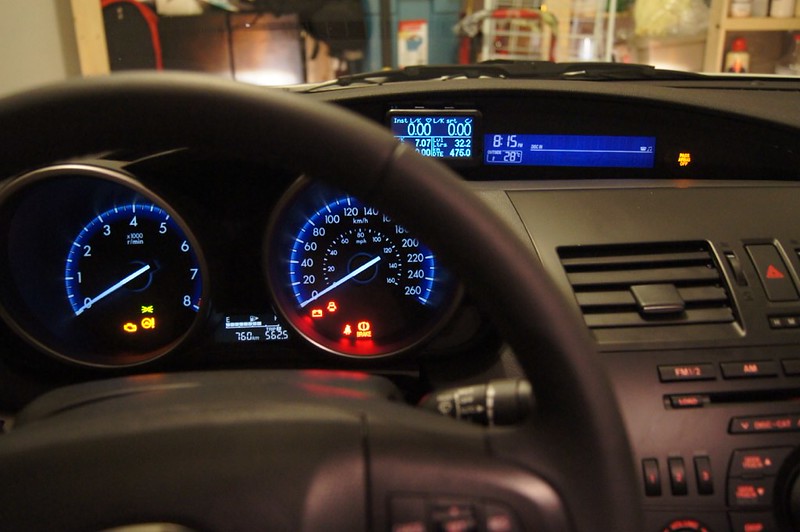
UltraGauge install in 2012 Mazda5 Sport

JMJinNC

Member
:
2012 Mazda5 Sport 6-speed
I bought an UltraGauge to show MPG and fuel status for our 2012 Mazda5 Sport (6-sp).

I chose the UltraGauge since it is inexpensive, small, and displayed all the gauges I wanted.

It comes standard with a clip-mount for the display itself, and I fabricated an angled intermediate mount to orient it towards the driver about 10. I mounted it to the RH switch blank to the left of the top cubby.

I popped out the lower dash section, which allows access to the lower 4 switch-blanks as well as limited access to the upper 2 switch locations. I relocated the TCS switch and mounted it in the lower LH location, ans moved another blank to the upper LH spot.

Then I removed the upper RH switch-blank and drilled a mounting hole and a wire access hole. The angled intermediate mount is secured to the switch blank, and the mounting clip is screwed to the intermediate mount. The extra loop of cable is fed into the wire access hole and zip-tied into a tight bundle.

Visibility is very good. Not an OEM looking install, but it works.

0DED25A5-46FF-4DAC-9390-196E946E92CF-3757-000006562C3D8924.jpg

D66CD8D4-5583-4A3B-8AA3-8B66165E9D0A-3757-0000065643F281BA.jpg

5DA054F7-D8BB-4A7E-B6F9-93A50CE490C7-3757-0000065635F05840.jpg


JMJ
 
Cool. I am thinking of getting an Ultra gauge to replace my Scangauge2 bc it has data logging. It also nicer display.


Regarding switch blanks, perhaps you can take some pics and make the other thread a how-to. This will help others who may want to tackle the same.
 
Great idea - unfortunately getting the switch blanks out is a major PITA if you have large hands (which I do), and I was very time limited so I opted not to take pix as I went along. Plus, for the last part of the install, I had my 2-month old son stuck to my chest in his Bjorn carrier. He was a real trooper about it though...

There was a thread on this BB regarding installation of a Scan Gauge on the lower 4 switch-blanks. I used info & pix from that thread for my install.

Linky: http://www.mazdas247.com/forum/show...Splash-Guards-amp-Tailgate-Step-Plate-Install

Next time I'll keep the camera handy.

JMJ
 
Last edited:
I just got a Scangauge II for Christmas and I saw the posts on this forum about mounting it in the space taken up by the 4 blank switch covers left of the steering wheel. While this is a slick option for mounting and looks like it could have come that way from the factory, the unit just isn't very visible while driving. Instead, I decided to mount the unit on top of the HVAC and temp display on the dash. The cord does run along the dash but it can be routed to sit in the seam where the panels meet. It's not too bad and the Scangauge is easy to see. I've been using it a lot to monitor real-time MPG and the trip functions.
 
I just got a Scangauge II for Christmas and I saw the posts on this forum about mounting it in the space taken up by the 4 blank switch covers left of the steering wheel. While this is a slick option for mounting and looks like it could have come that way from the factory, the unit just isn't very visible while driving. Instead, I decided to mount the unit on top of the HVAC and temp display on the dash. The cord does run along the dash but it can be routed to sit in the seam where the panels meet. It's not too bad and the Scangauge is easy to see. I've been using it a lot to monitor real-time MPG and the trip functions.

Mark - how are "resetting" the scangauge after filling up with gas?
It seemed mine was doing this automatically for while, but lately it doesn't seem to be recognizing that the tank went from near empty to full. So all of the MPG/DTE readings are off.
It's a bit of an ordeal to "reset" it manually, requiring re-entering in the capacity of the tank every time.
The novelty has worn off quite a bit on this one, after playing around with it for a while I haven't made use of it much it at all recently...

thanks!
Kurt
 
I love the Ultra Gauge's automatic fillup detect feature. It didn't work in my old 2007 Mazda 5 though, but it works perfectly in my 2012 Mazda 3.

I originally mounted my Ultra Gauge where the OP mounted it, but I found it was not great leaving it way down there, it didn't allow me to safely scan the numbers while driving. I used the very good windshield mount and put it in the bottom left corner.

But in my 2nd gen Mazda 3, I used this mounting location which you could also use in your 2nd gen 5:

7934584112_1f79143e14_c.jpg


I used Velcro I got from a local hardware store, although I wish I found automotive grade Velcro.
 
I love the Ultra Gauge's automatic fillup detect feature. It didn't work in my old 2007 Mazda 5 though, but it works perfectly in my 2012 Mazda 3.
Interesting. I hated that the SG2 required a manual rest so I only used the real-time monitor. I wonder what it detects that make it not work in your '07 Mz5..?..

If I need another dash top monitor, I'd look into the UG. I really like the data logging capability too.
 
Last edited:
I learned this week that the "Mazda-specific" Xgauge codes for Transmission Fluid Temp will not work on the ScanGaugeII in my 2012 Mazda5 Sport AT. All the information on the Linear Logic website says it should work in 2006+ Mazda5. Even with customer service assistance, there doesn't seem to be a solution. I even tried the "Ford-specific" Xgauge codes for Trans Fluid Temp...no luck. Does anyone on this forum know of any Xgauge codes that work on the 2012 Mazda5?
 
^^Sorry you haven't had any more success with that with your SGII. My SG had never had an auto fill-up feature and i guess I am in the minority in not minding the manual option. My needs suit the manual fill up quite well, i regularly do a short fill to get me home from work where the fuel is markedly cheaper (3.89 in town 3.25 in the country) This would drive the auto fill bonkers i'm sure. My trouble has been that I cannot get the "fuel Level %" x-guage to function, been thinking about going with a new UG as my SG is working on eight years old .... To the OP that is a very slick install kudos!
 
Back