
wireless help

MiaTurbo

Member
Contributor
:
FSM 1.5.b "Kluge";FSM-SV "Ramalamadingdong"; Civic High-Bread
I'm rearranging furniture and putting my desk on the other side of the room. This will put it away from the wall jack, and the wired router. The router will go to the next room actually, and I fired up the wireless router so I can still get online from the living room.

Under the 'Choose a wireless network' it says there is no signal strength, but I'm connected. Under the actuall network card properties it says full signal strength. But I can't connect using the wireless card, not even to the router itself. Ideas?

The router is a Linksys BFW11s4. Card in PC is a D-Link DWL-520+
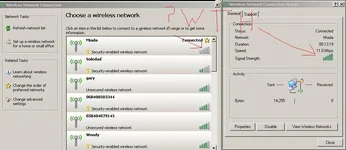
 

Attachments

  • wireless.webp
    wireless.webp
    43.9 KB · Views: 117
EIther the wep key is wrong, or dhcp on the router is screwed. Try to reboot the router, and double check the wep key on your puter.
 
i tried rebooting the router, and PC. No changes. DHCP is off, and the key is right...

I got frustrated soon after I posted and just did a hard reset on the router returning it to factory specs. it works fine now. Stupid technology. Sometimes you just need to kick it. I've changed things n the router before for forwarding, so I might have missed something. I don't need forwarding anymore, so i said the hell with it (even though it was working fine hardwired..).
 
check to see if you have a mac filter issue, and double check the key. usually when you have a connection and only an 11mb speed, your key is wrong.
 
It works fine now because I reset the router. I don't remember ever filtering by MAC address, but it's too late now to troubleshoot it, lol. I got fed up with it (working on it about 1 hour before I posted..)

And I'm only on a 802.11B network, so 11mps is fine with my blazing super fast 1.5mps DSL line, lol ;)
 
I figured you'd be on at least a g network..

I <3 my netgear rangemax wpn824 :)
 
A g network is overkill for me. For what I do, my connection is pretty much limited to the DSL line. in the last hour since I got the wireless fixed, I tried to upload some large files. I haven't noticed any difference in speeds.
 
Yeah if you have DSL it is kinda pointless. It is pretty much like driving as fast as you can so you can sit in traffic later.
 
I think I know what may have been part of the problem. When I installed the wireless card in the PC, i didn't install D-Link's utility, just the driver. Well, sometime this morning the transformer for my Linksys wireless router died, so I had to buy a new router (splurged and got a 802.11g, even though a 802.11b is more than enough for my DSL line, but they don't sell 'b' routers anymore:rolleyes:). And again, i had issues setting up the wireless. So on a whim, i installed the utility, and now it works. Stupid hardware.
 
if you set the router back to default at least make sure you put some encryption on the network

i have been stealing both of my neighbors wireless connections with my laptop for months because they are too stupid or lazy to put on simple encryption
 
Back