network help???

EcLites

Member
:
01 Mitsubishi Eclipse
Ok here is the current setup I have right now.

diagram25dn.jpg


I just bought a router for my room as you can see in the picture.

Before all I did was simply switch out the one cable coming from the nyko net extender between the xbox and the PC. I decided to get the router so I wouldnt have to do that anymore.

But heres the problem. Now when I have the router plugged into my xbox and PC in my room, the internet on the computer in the study goes out.

Help! I need all the stuff running the internet at once.

You can find out about the nyko net extender here:
http://www.pcmag.com/article2/0,1759,1546453,00.asp
 
couple of things

1) check the IP address of the 2 routers, they might be the same
2) check the DHCP scopes for the PC's again it might be handing out the same IP's to the PC's or xbox

bet its one of those which will cause a shitload of errors on the network and drag everything to a grinding halt :)
 
tekkie said:
couple of things

1) check the IP address of the 2 routers, they might be the same
2) check the DHCP scopes for the PC's again it might be handing out the same IP's to the PC's or xbox

bet its one of those which will cause a shitload of errors on the network and drag everything to a grinding halt :)

How do I do this? Sorry i'm a computer newb :(
 
most routers use the IP 192.168.1.1, so you need to go into the config and change one of them to 192.168.1.2 for instance

and then for the DHCP scopes they usually use 192.168.1.100 -254 for instance, so you could change one to be 192.168.1.100-199 and the other 192.168.1.200-254 not that you will ever need that many

most vendors have this stuff on their site, for instance if its a linksys it will look something linke this :) http://linksys.custhelp.com/cgi-bin...HQ9Y2hhbmdlIGlwIGFkZHJlc3M*&p_li=&p_topview=1
 
tekkie said:
most routers use the IP 192.168.1.1, so you need to go into the config and change one of them to 192.168.1.2 for instance

and then for the DHCP scopes they usually use 192.168.1.100 -254 for instance, so you could change one to be 192.168.1.100-199 and the other 192.168.1.200-254 not that you will ever need that many

most vendors have this stuff on their site, for instance if its a linksys it will look something linke this :) http://linksys.custhelp.com/cgi-bin...HQ9Y2hhbmdlIGlwIGFkZHJlc3M*&p_li=&p_topview=1

I dont quiet get this.

So I logged into the IP addy for the router.

Currently the LAN Ip is set to this:
LAN IP Address 192.168.1.1

So I change that to 192.168.1.2, right?

And then for the DHCP Server it is currently set to:
Start Address 192.168.1.11
End Address 192.168.1.254

Which one do you want me to change there?
 
I think you want to change the start and end addresses. See attached. Change the addresses to 101-200 in the area circled (101 = starting, 200 = ending). I think you want to change it in the router in your room.

Also, check the ip address of both routers. If they are the same, you'll want to change the ip address of the router in your room, too. 192.168.1.100 for example.

Are both routers the same brand?
 

Attachments

Last edited:
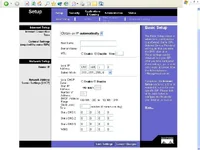
Heres a screenshot of what the setting are on the linksys router in my room.
 

Attachments

  • linksys2.webp
    linksys2.webp
    63.5 KB · Views: 140
I think your routers are probably fighting each other. What you really need in your room is a hub/switch instead of a router, but a router can be made to do the same job. Here's an article on that, good luck.

http://www.ezlan.net/router_AP.html
(it's about a wireless router, but as it says, it should work for wired as well)
 
EcLites said:
Heres a screenshot of what the setting are on the linksys router in my room.

and it does not work with this setup? what is happening? it should work like that

what is the IP of the other router?
 
actually I have another question for you, have you loaded any software on those PC's that log you into your internet connection?

the reason I ask is because I have seen people that still do this and dont setup the router to do the authentication, and the internet company sometimes limits how many can logon simultaneously

I dont think this is the case but figured it was worth mentioning :)
 
The first router with the modem is your gateway.
The second router is used as a switch (hub).

1) Disable DHCP on the second router.
2) Give it an IP you will not use like 192.168.1.254 (with mask)
3) Connect the extender and other devices on the switch side, nothing in the WAN port (for the room router only).

You do not need the second router ... just a hub or a switch.

The other option is to create 2 separate networks (2 subnets), but that's another ball game.

Let me know where you are reached.
 
Last edited:
Thats what i figured. I just bought a switch online today. Hope it works!

thanks for the help guys!
 
Just jumping in to say that the switch will fix your 2nd router problem.. But I guess you figured that out already.
 
Back