Liftgate won't operate unless car is turned off / in accessory mode

yes. On 2018 FOB has a picture/outline of the car with liftgate open and the word HOLD below it. ;)

That does not "hold" anything. To hold the liftgate in place you press the liftgate button while it's lowering or rising. That will stop it where it is.

The "hold" button is actually the "panic" button to set off the lights and alarm. Thankfully there was no one in the parking lot when I pressed that button.

IskiE
 
I just checked mine and the switch we’ve been talking about is there. It’s to the right of the license plate lamp. I never noticed it until now but I learned another new feature here thanks to everyone.
 
That does not "hold" anything. To hold the liftgate in place you press the liftgate button while it's lowering or rising. That will stop it where it is.

The "hold" button is actually the "panic" button to set off the lights and alarm. Thankfully there was no one in the parking lot when I pressed that button.

IskiE

I am located in the USA . First time listing a picture using taptalk....hope it works.

4 possible buttons on my FOB ...one button depicts the car with liftgate up and the word HOLD ....that is what I do to open the liftgate from outside the car.

The last button shows a[ ! HOLD ]on it.....that is my panic button. Hope the picture and explanation clears things up. 20180207_093434.webp
 
It gets confused because the “hold” also refers to the trunk or cargo area of the vehicle in some parts of the world.
 
That does not "hold" anything. To hold the liftgate in place you press the liftgate button while it's lowering or rising. That will stop it where it is.

The "hold" button is actually the "panic" button to set off the lights and alarm. Thankfully there was no one in the parking lot when I pressed that button.

IskiE
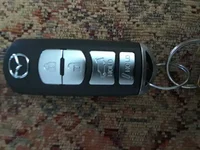
So much confusion!

There are TWO buttons labeled "HOLD" on the 17 fob. The lowest one [the one with the exclamation point] is the "panic button". Long press to activate [that's what hold means]. The next one up [the one with a picture of the car] operates the liftgate. Long press to activate. Up OR down. While the liftgate is moving, a short press on ANY of the three controlling buttons will stop the movement. The next long press reverses the movement.

It's really pretty straightforward.
 
Panic buttons are like car alarms... people used to notice/pay attention to them back in the 1980's. Now they are just part of background noise.
 
No panic button on the UK fob. We’re all cool as cucumbers here (thumb)(thumb)

They are parking lot car locators as far as I'm concerned. I'll admit, I've successfully used it to find my Acura more than once.
 
Get the MyMazda app. It will locate the car for ya.

I tried that app and didn't see anything of value in it. But a car locator would be.
Can you tell me where to find that feature [android]?
 
I tried that app and didn't see anything of value in it. But a car locator would be.
Can you tell me where to find that feature [android]?

I have iphone but from home page select OWNERS then FIND MY CAR is in a menu at the bottom. I’m hoping the Android version is the same or close.
 
MyMazda app must be USA only. No such app if looking from Oz on Google Play
 
There are applications for Android and iOS that can remember your car park location, I am sure. No need to use an official Mazda app.
 
Reinstalled it.
Couldn't find it.
Uninstalled it.
Don't need it either. May have the only red 2nd gen in town.
But always curious. :)
 
Back