Annoying Spyware/Virus??

sgryzko

Member
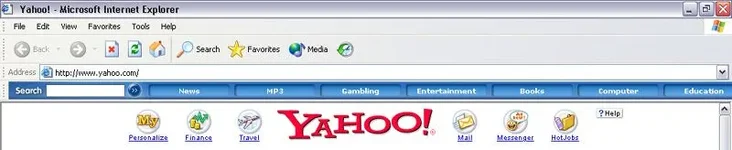
Everytime I load my internet explorer, some spyware or a virus or something keeps changing my homepage into http://searchexe.com/passthrough/index.html?http://www.yahoo.com/ instead of the site I wanted: www.yahoo.com . It isnt harmful or anything, its just an annoying popup that eventually dedirects me to yahoo.

Also, even after I delete it, this folder called Jugs Thunk always reinstalls itself into my Program Files. This folder seems to make a new toolbar on my internet explorer. This toolbar always pops up even when I exit it.

Is it possible to make windows prohibit a certain filename from existing? I want to tell it to prohibit c:/Program Files/Jugs Thunk from existing.

Also, Is it possible to lock the homepage so you cant change it?

Any help would be appreciated.(yippy)
 
spy sweeper hasnt fixed my problem yet, it just tells me that my homepage has been changed and asks me if I want to keep it @ yahoo.com or if I want it changed. :(
 
girth said:
Use adaware and spy sweeper. They're both free and they will fix your problem.
I have used ad aware and "spybot: search and destroy". I will try that online virus scan and the spy sweeper.
 
I mis-typed "newsweek" when going to their site a couple of weeks ago and picked up one of those things. It changed my home page to something else and would re-do it every time I changed it back. Norton Internet Security let it in and 4-5 different spyware programs couldn't get rid of it.

So, I ran a system restore from before the thing showed up and it took care of it immediately. You might want to try that.
 
msubullyfan said:
I mis-typed "newsweek" when going to their site a couple of weeks ago and picked up one of those things. It changed my home page to something else and would re-do it every time I changed it back. Norton Internet Security let it in and 4-5 different spyware programs couldn't get rid of it.

So, I ran a system restore from before the thing showed up and it took care of it immediately. You might want to try that.
I've had this thing for sooo long though. I probably should've thought of a system restore about 3 months ago when I first got it.
 
AlbinoMuntjac said:
Or, if you can get the name of it, search it on Google and you'll probably find manual removal instructions.
Well the program files folder is Jugs Thunk. And the toolbar name is Funk Date Dead.

Those are really weird names. I wonder who came up with them(smoke) .
 
i had over 30 trojans and other viruses in my computer over the past several months.....restores and reboots didnt help...i ended up gettin a bull dog firewall and anti virus and had it scan my whole hard drive....found all the viruses and removed them and stored them in a safe folder until i wante dto erase them...my comp is blazin once more with no pop ups or other annpoyin s*** (yippy)
 
hijack this! is the best thing to get rid of s*** changing your homepage, searchpage, etc. Just MAKE SURE you give it to someone who knows what they are talking about and can tell you what is OK to fix, or you can mess your computer up pretty bad.
 
Has anyone else seen this toolbar? This is the jugs thunk one I was talking about and it reinstalled itself on my computer today.
 

Attachments

  • jugs thunk s***.webp
    jugs thunk s***.webp
    15.8 KB · Views: 120
i "THINK" that is the all about seaching tool bar, its an anoying mofo, here is a tool to remove, (ive used it on about 5 client machines and its worked everytime)
 

Attachments

pr5owner said:
i "THINK" that is the all about seaching tool bar, its an anoying mofo, here is a tool to remove, (ive used it on about 5 client machines and its worked everytime)
I'm pretty sure this worked. Thanks a lot because that thing was sooo annoying.(headbang)(bowdown)
 
Back