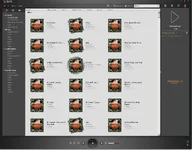
wmp album art all the same

:
GLA45
my windows album art somehow got to be the same for a lot of my music. a lot of the mp3's are pretty old and i'm sure the id3 tags are terrible but i'm not going to fix that nor do i care. the problem is that the sublime album cover is assigned to almost every song and it's annoying me. i never noticed until i got my zune and it keeps showing up everywhere but it's been happening in WMP for a long time. i just want it back to the "no album art" image, whatever that is. does anyone know how to fix this? i'm guessing the file for the default album art got overlaid somehow but i don't know where that is so i can't replace it with the default file

 

Attachments

  • sublime.webp
    sublime.webp
    64.9 KB · Views: 331
the only problem with that is there's no way i'm going to go through all of my songs and fix each one manually. i have probably 5gb worth of music, that'd take entirely too long
 
you damn kids today, so lazy! :)

ill keep looking.

what if u went into the program files\windows media player\installer dir

and reran the setup, maybe it will replace it with the default?
 
Last edited:
i actually reinstalled wmp10 not too long ago because of a botched wmp11 install. and the sublime cover remained. over the weekend/next week i'm going to start poking around in the files in the directory and see if i can find one that is a sublime album cover
 
I know jack about Zune... but from a Windows Admin perspective try this...

Open any folder directory (Like My Documents)
Select Tools at the title bar
Select Folder Options
Select the File Types tab
Look up the MP3 or maybe WAV file extensions

What's the icon next to those look like? Is it the WMP icon? From here we'll know which program is doing it for sure.

So post back.
 
i'll check it when i get back home around 8. i'm almost positive it's going to be the wmp icon though as that's my default player for almost all media and i think this was a pre-zune problem, zune just made me care it existed
 
Back