Network Cableing

Shane5425

Contributor
:
2011 Mustang GT
ok, got a question about my network in the house?

I have a wirelss modem that runs my sisters laptop and my moms main pc. I have a cable routed from that router to my room, my question is what type of cable is it supposed to be , crossover , straight, or rollover?? i amgoing from a router to router, then from that router in my room , i am going from the router to my PC , xbox and ps2.
 
don't use a straight through or crossover. especially not a straight... thats token ring crap..

your basic cat5 ethernet patch cable will do it. no need to get fancy.
 
k, i gonna have to check the wiring on my 40 foot cable i made, the cable works, but damn it gets slow as soon as i put 2 things on the router.

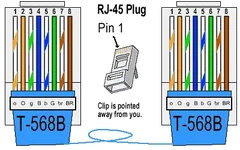
whats the color code for standard patch cable? i am gonna go look it up , but wondering if you might know it right off hand..
 
just a plain jane cable from the router to computers...
 
regular rj45 cable. cat 5e or cat 6. it's a straight through cable.
crossover cables are only needed if you connect 2 computers directly to each other
color code. are u making this yourself? do a search for 568b and that will tell you
 
You should have a straight cable and a little switch in your room to plug in multiple devices and at the same time eliminate packet loss on the line, don't try a cross over cable that long it won't work properly. Anyway I attached a pic of the way the cable should look like on both ends.
 

Attachments

  • rj45-cable-568b.webp
    rj45-cable-568b.webp
    13.5 KB · Views: 104
i just wired my apt. with cat 5e and we just used rj45 connectors and crimped them on. The wall plates and female connectors were pretty pricey at home depot, so we just wired them right to our computers.
 
i had it wired up, but as soon as put 3 thing son it its slow as a mofo.. i was seeing if i wired it wrong..
 
PaulMP3 said:
i just wired my apt. with cat 5e and we just used rj45 connectors and crimped them on. The wall plates and female connectors were pretty pricey at home depot, so we just wired them right to our computers.
I ran 30 ports in my house with Cat6. I found some cool tool-less keystones online for about 2 bucks each. I got dual keystone faceplates for a buck apiece.
I like the tool-less keystones all you have to do is place the wires in and close it.
I used a network tester, fixed all the things I had wrong and now I have a sweet pad for LAN gaming. I just bought a simple Belkin router with 802.11G and hooked my DSL modem to it and then uplinked the router to my network.
I got a nice rack from work for free and mounted all my stuff in it. Now you could come over with any device, console, laptop, PC and either plug it a port or use the WIFI.
 
shaneMazda2000P said:
i had it wired up, but as soon as put 3 thing son it its slow as a mofo.. i was seeing if i wired it wrong..
What are you using to split the connection to the 3 devices? If you have a hub this is posible and if you have 3 long wires could be posible as well but if you have a switch it shouldn't happen.
 
dork....


j/k

I have three computers myself and I custom built my firewall..
 
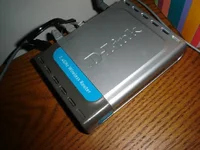
the one in the front is a d-link wireless dsl/cable router
and mine is a belkin dsl/cable router
 
wait, hold up a sec.. there are two routers??? one downstairs and one in your room? that could be your problem. use a hub in your room instead of a router.
 
shaneMazda2000P said:
the one in the front is a d-link wireless dsl/cable router
and mine is a belkin dsl/cable router
Just configure the belking to disable dhcp plug the cable coming from the other router in one of the ports you would plug in the computers and it should work fine what's happening is that you are double nating in the same network and that is not recomended.
 
seanmcsean said:
wait, hold up a sec.. there are two routers??? one downstairs and one in your room? that could be your problem. use a hub in your room instead of a router.
that could be the problem. he is right. 2 routers will not work well together.
now you can run a router and a access point. that's my setup and it works fine ;)

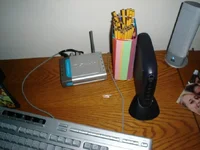
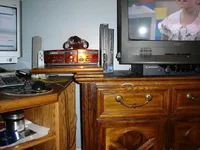
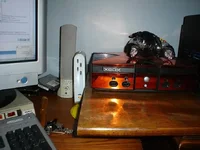
can you take some pics of your setup?
 
It all depends on what you want to do. I have a dual wifi router set up. One is a protected access point, the other is an open one. Firewall rules were written to allow access to just the protect router for internet while all other ip's were blocked. Pretty simple setup, and when friends come over, no network key is needed to be given out.
 
Paul said:
that could be the problem. he is right. 2 routers will not work well together.
now you can run a router and a access point. that's my setup and it works fine ;)

can you take some pics of your setup?

here..
 

Attachments

  • meg 001.webp
    meg 001.webp
    28.5 KB · Views: 105
  • meg 002.webp
    meg 002.webp
    39.2 KB · Views: 96
  • meg 004.webp
    meg 004.webp
    12.6 KB · Views: 96
  • meg 005.webp
    meg 005.webp
    53.7 KB · Views: 98
  • meg 006.webp
    meg 006.webp
    35.7 KB · Views: 100
pphhsstt. your not supposed to have your tv sitting on top of your cable box. (sssh)

so the room where ur modem is, why not connect that directly to what u need it to and make the other room wireless?
 
Back