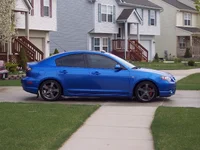
Hers my new signature. I just got photoshop so i dont really know how to use it so dont hate too much. Any info or tips on how to use photoshop would be greatly appreciated.
the bike looks thrown on lol. But I like the sidewalk idea - some of the text is overflowing onto the grass, though. And don't put in Mazda3. If they don't know what it is and how to find out what it is, they shouldn't be on this forum .
its adobe photo shop CS2. and im not worried about a warrenty, im on my 2nd motor already and have no warrenty.lol.
and i dont know why the edges look goofey, its a 6.1 MP camera so the resolution should be good...i dunno. its good enought for me. And i gotta use the plate, who else has one that says mazda3? not just an abbreviation.
its adobe photo shop CS2. and im not worried about a warrenty, im on my 2nd motor already and have no warrenty.lol.
and i dont know why the edges look goofey, its a 6.1 MP camera so the resolution should be good...i dunno. its good enought for me. And i gotta use the plate, who else has one that says mazda3? not just an abbreviation.
I do not think it is a problem with your camera. Sometimes artifacts are introduced by software when it resizes an image.
Does anyone see what I'm trying to say? Maybe you didn't quite keep the proportions when you resized the image, I'm not sure what settings there are in photoshop...
BUT if you would like to see if there is a difference, post the original picture (the way you got it off the camera) and I'll try to illustrate it.
A good beginners tip for you: When you want to edit an image like that copy it to a new trasparent work area. I always thought it was a good idea to work on an actual layered Photoshop image rather than layer onto a Jpeg. It's saved me a few headaches before.
I'm not familiar with Photoshop CS2, but when you resize the image, if there are any options for different ways of scaling, pick the slowest one(should be called cubic interpolation or something like that), it won't take longer than a second, and the results should be better.
Also, if you don't want your image to link to imageshack, just use this code
<img src="http://img331.imageshack.us/img331/5902/signaturemazdacopy8if.jpg"/>
I do not think it is a problem with your camera. Sometimes artifacts are introduced by software when it resizes an image.
Does anyone see what I'm trying to say? Maybe you didn't quite keep the proportions when you resized the image, I'm not sure what settings there are in photoshop...
BUT if you would like to see if there is a difference, post the original picture (the way you got it off the camera) and I'll try to illustrate it.
give it a shot, although i have no idea what everyone else is talkin about with the layering thing. I have no idea how to use any of the features on this program.
i just attached that pic and the forums resized it and it still looks all jagged on the edges, it doesnt look that way if i just view it on windows pic viewer.
Dont do it!!!!!! Michigan sucks so bad, im tryin to move outta here and people like you want to come here, i just dont get it.lol. But seriously michigan weather sucks ass, maybe its just because i hate the snow and cold, i dont know. I live in ypsilanti, near ann arbor. Its about 2 hours from lansing i think.
give it a shot, although i have no idea what everyone else is talkin about with the layering thing. I have no idea how to use any of the features on this program.
i just attached that pic and the forums resized it and it still looks all jagged on the edges, it doesnt look that way if i just view it on windows pic viewer.

 .
. .
.