Dual Layer DVD Burning

CasopoliS

Member
Contributor
:
05 Legacy GT, 06 Accord SE, Civic
I have a Samsung Dual Layer DVD burner, but have never used it. I do not have another DVD drive on my computer, just a CD drive. If I want to copy a dual-layer DVD (or single-layer for that matter), what method do you recommend? I have a 150 GB HD, and I am guessing I have to temp. store the DVD onto the computer before burning it onto a disk. What software do you use, and how do you like it? Any disk recomendations? Websites where you can get dual layer disks for a good deal? I really appreciate and input, as I am new to the DVD burning world. Thanks in advance.

 
dual layer disks are very very $$$$$, mos DVD's have copy protection, I have not really taken the time to look for a program to deal with that, but I know that there are a few out there
 
I guess then, what software is good for comressing movies down? I know there are some out there where you can eliminate special features, decrease sound quality, or decrease video quality. Thanks.
 
if you want to just play them on your computer microsoft makes a thing so you can compress stuff to WMV, most importantly you can get it for free, thing that sucks is I cant remember the name of it :(
 
If you wanna do dual layer you have to buy dual layer disc they are like 25 bucks for 3. If you want to copy a dual layer to a single layer (disc are really cheap) The you need Apollo DVD Copy it decrypts the disc and makes a compressed copy that will fit on a regular dvd. It aslo allows you to take the subtitles and such off. You can download a trial at http://www.xtodvd.com/
 
dvd decrypter will allow you to burn the copyrighted files onto your hard drive in raw format (about 6 gigs) and then you can use whatever buring software you would like to burn copies onto a disk of your choice. I personally use CloneDVD2 and love it. Really easy to use, can copy just want you want (dvd menus, or just the movie, subtitles, audio streams) and it automatically rerenders for the most quality to fit on a disk (regular or DL).

http://www.dvddecrypter.com/

http://www.slysoft.com/en/clonedvd.html
 
Last edited:
Thank you everyone. I am going to try compression onto single-layer for now to see the results. I really appreciate it.
 
dvd decrypter and dvd shrink.

i burn like 3 movies every weekend lol..

-B
 
DVD shrink all the way. Totally free, great results, and it supports dual layer discs now.
 
I just got my first DVD burner, so all this info is great. Thanks Dooodes. Positive rep and candy for everyone!!
 
the only advantage to dual layer burning is that you require zero compression to copy. although this might be important to some people, to most it's not.
you can compress a movie to 80% of it's original quality, and nobody will ever notice on a standard TV.

I've burned about 300 movies in the past months... just recently got a dual layered DVD-RW just for the sake of having one (spin) I'm not intending on burning dual layered DVDs cuz they are tooooo expensive. I pay about $0.20/DVD-R, so to pay $10/DLDVD-R is not cool. i'll just burn 50 DVD-Rs instead.
 
Ok for those using DVD Clone....
I bought TDK DVD+R last night.
I only have the DVD drive so I have to copy onto HD first.
I put a DVD in the DVD burner.
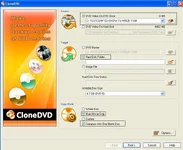
Opened DVD Clone
Selected the options seen in pic #1
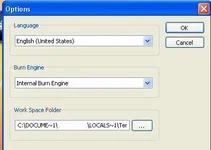
I kept the options in the option window as default as seen in pic #2
It went through the copy cycle and it said congrats. Now I have 3 new folders:
DVD_VIDEO
sub: AUDIO_TS
sub: VIDEO_TS
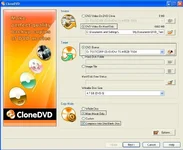
I start new DVD project and select the settings seen in pic #3
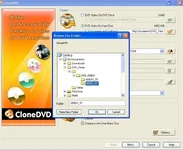
As source I selected "video on hard disk", and selected the VIDEO_TS folder as seen in pic #4.
I set the DVD drive as the target.
It goes through another copy cycle (dont know why), then a burn cycle.
The DVD plays like DVD's do on my computer, but when I put it into my JVC XV-S300 DVD player I get nothing. In the manual there is a "not playable" list and DVD-R is on there, but not DVD+R. I have heard both formats work on it though.

DAMN ok thanks for reading all that. Can you help me? People that use this software (and burn to HD), what steps do you go through? Does DVD Clone finalize the disk? Should I target an image file rather than a folder in the first ripping step?

Thank you so much!
 

Attachments

  • copy_01.webp
    copy_01.webp
    43.8 KB · Views: 137
  • copy_02.webp
    copy_02.webp
    9 KB · Views: 137
  • copy_03.webp
    copy_03.webp
    44.7 KB · Views: 136
  • copy_04.webp
    copy_04.webp
    44.4 KB · Views: 130
Lil Freek said:
the only advantage to dual layer burning is that you require zero compression to copy. although this might be important to some people, to most it's not.
you can compress a movie to 80% of it's original quality, and nobody will ever notice on a standard TV.

I've burned about 300 movies in the past months... just recently got a dual layered DVD-RW just for the sake of having one (spin) I'm not intending on burning dual layered DVDs cuz they are tooooo expensive. I pay about $0.20/DVD-R, so to pay $10/DLDVD-R is not cool. i'll just burn 50 DVD-Rs instead.

No, hell some movies compressed at 30% and you can notice the pixelation on some scenes. Try doing the Sopranos disc sets -- most require 40% compress and in a lot of the head-shrink scenes the wood panel walls are pixelated. Also, dual layer discs are down to $3 a disc now (maybe even lower) if you shop around.
 
Back