- :
- 2025 CX-5 Turbo Premium
As I've mentioned last week, I've got a 2025 Mazda with the 7th generation infotainment and I am trying to get accustomed to it. I've got few questions, maybe you have some answers:
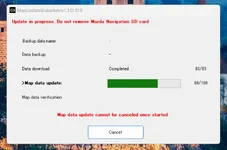
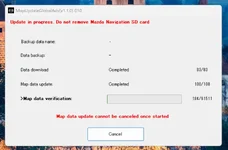
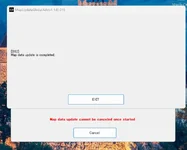
1. I bought an SD card from e-bay, managed to update the map to the latest release, September 2025. However, it did not let me do a back-up and got a message saying that the card was corrupted. Yet I was able to use the navigation today with no issues, none noticed, anyway. As soon as I received the card, I tested it, drove around, everything looked good to me. Then I spent almost two hours with the update. After the update was complete I re-inserted the card into the nav port, the map popped up, everything looked good. Checked the map version and it says 25Q1011500. I wonder if this the latest map version and whether this card is it really corrupted or some other people got similar message although, like I said, the card work just fine, no errors while using the navigation, the update succeeded but no back-up? So this is one question, what's the latest map version.
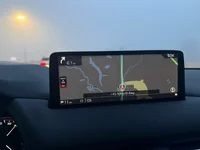
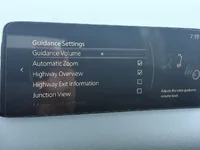
2. And now the second one. Please look at the pictures: How can I get rid of the black info table on the right side of the screen? On the 6th generation it was easy to hide it but on this generation I can't seem to figure out how to hide it. I don't need to know where the next gas station is at all times. I'd rather have the whole screen showing me a clean map.


1. I bought an SD card from e-bay, managed to update the map to the latest release, September 2025. However, it did not let me do a back-up and got a message saying that the card was corrupted. Yet I was able to use the navigation today with no issues, none noticed, anyway. As soon as I received the card, I tested it, drove around, everything looked good to me. Then I spent almost two hours with the update. After the update was complete I re-inserted the card into the nav port, the map popped up, everything looked good. Checked the map version and it says 25Q1011500. I wonder if this the latest map version and whether this card is it really corrupted or some other people got similar message although, like I said, the card work just fine, no errors while using the navigation, the update succeeded but no back-up? So this is one question, what's the latest map version.
2. And now the second one. Please look at the pictures: How can I get rid of the black info table on the right side of the screen? On the 6th generation it was easy to hide it but on this generation I can't seem to figure out how to hide it. I don't need to know where the next gas station is at all times. I'd rather have the whole screen showing me a clean map.
Last edited: