
Can I use a Western Digital Passport on my headunit?

Ricktalife

Member
:
2012 Subaru WRX
I have a Pioneer AVH-P4100DVD touchscreen with the optional iPod hookup cable that I have used to connect my iPod Classic that I bought back in 2006. Well as you can assume, the iPod's battery is pretty much fubar now and I've read on Apple's website you can get a replacement battery for it but that will cost $60 which is just stupid since I knew I could get a USB drive with more space for about the same price.

Well I went to Walmart looking for a USB flash drive (preferred a 32 gig so I would not have to worry about running out of space) but they were out so my inner impulse buyer kicked in and I walked out with a 320GB Western Digital Passport for about $70. Now I know what you're thinking. Do I have a need for 320GB's worth of music and movies (which I won't watch) in my car? Absolutely not. But what I do have is yet another Western Digital Passport drive connected to my computer that holds about 160GB. So I bought the new one to replace the old one for storing movies and such on my computer, and figured I could convert the old one to an iPod replacement.

So I go to plug in the 160GB drive in my car, and I get the message "N/A USB". After browsing through the manual as well as the Internetz I found out that it must be formatted in FAT32 instead of NTFS. So I discovered a simple program to do so, and BAM it's done. Went to try it again, same message.

I've been looking through the manual, Western Digital's website, Pioneer's website and other random sites but still can't figure it out. Ideas?
 
the only thing i can think of offhand is you might have to make the drive bootable, but i doubt it.
what utility did you use to format it? the one from HP? and does the drive spin up when you connect the USB?
 
Last edited:
ok so stuff ive read says the enemy is power... headunits generally can't supply more than 500ma through USB, so theres a bazillion ways you can (probably) solve this if you feel like hacking it together.
you can break the USB cable open, use a voltmeter to find your power wire, cut it, and run it fused 1A to +12V ACC
you can buy a USB Y cable that would fit your needs
or you can read around online to find a compatible HDD.
 
Hmm. Well I'm not an electrician so I'll pass on the hacking haha.

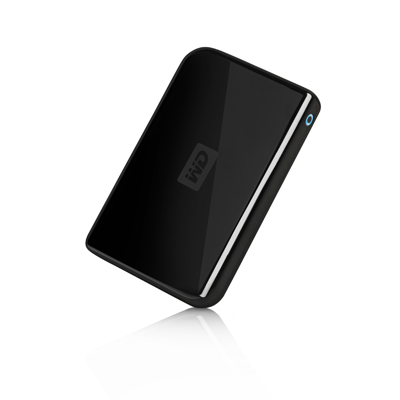
It looks basically like this:
wdfpassport_portable_2.jpg


Whenever I plug it in and turn the car to ACC, there is a white USB logo that lights up so the drive must be getting power. I'll have to see if I can figure out exactly how much power it uses, but if it just uses USB to power it, I would assume the headunit can handle it since it comes with a USB input on the rear.

I used a very basic program called "fat32format". It's just a command line .exe file that formats the drive from NTFS to FAT32 in just a few seconds. I discovered a thread on some audio forum that suggested making a partition of 60GB since some headunits cannot handle more than that. So I did that, but still no luck.
 
yup same drive i own
don't bother with the limited partition, i dont think its your issue.

just because the drive gets power doesnt mean it gets enough power to spin up or read. i looked at the user manual which had info on the error but is really not very helpful. basically, "the drive failed to power on and read anything from a fat32 partition."

i saw something online which said these drives pull close to or over 1A. which is double the USB spec (.5A). some desktops wont even provide this, they think its a short on the USB bus.
you need a special "double usb" cable to pull power from 2 ports, only using one for data. you have to plug the power USB cable into any 12 volt accessory with USB power (inverter, iphone charger... etc), and the data cable into the headunit.
http://www.ritzcamera.com/product/EP36595480.htm?utm_medium=productsearch&utm_source=google

option b requires a .50 cent piece of wire, a 2 dollar fuse, and like an hour. have you tapped any of your wiring before?
 
Damnit. I haven't personally tapped any wiring before period. I had the headunit installed at a local audio shop in Carlisle, because the factory unit was from a junkyard and one of the springs was broken so it did not come out easily at all.

I may just look for a 32GB flash drive and sell this thing.
 
might as well start now. you wont have to cut anything aside from your USB cable and you can start to learn some of the wiring for the ignition harness and MSP in the event you decide to do some gauges, an AFC, etc.
seriously - strip two wires and cut one. the hardest part of this is going to picking a place to tap the USB cable and routing the wire.

at the risk of sounding a little too enthusiastic, i wouldnt tell you to do it if i didnt think you could. if my buddy, whos failed out of 3 different schools, can install aftermarket alarms and do car stereos for a living, theres no reason you cant.

if youre not at all comfortable with the possibility of ruining the USB cable, or the idea of getting your feet wet in the ignition harness, the flash drive is going to be your next option. or youll have to look online for low power options on the external HDD. ill take a look around to see if i can find any suggestions

oh one last thing, walmart has a no-questions asked return policy. open box doesnt matter. receipt is cash, without one its store credit.
 
Sorry for the late reply. Yesterday was my 21st birthday and no I didn't get completely shitfaced but I went to dinner with my family and didn't touch my computer.

So anyway, I could take the new Passport back, but I like it haha. I would rather sell the one I'm trying to use in my car since it is an older model with less storage space. Perhaps I could find somebody who would like to swap a 32GB flash drive for the 160GB passport. I'm sure somebody would love to take that deal (anybody reading this that is interested can feel free to send me a PM).

It's funny that you mentioned about the wiring because I actually have a boost gauge, a/f gauge, and SS AFC already installed haha. I did not do them myself since as I stated, have no idea what is what. I'm sure I could figure it out if I took my time but it just seems risky to me and the whole reason I thought of the Passport as a replacement iPod was for a quick fix. It has already proved much more of a hassle than I had hoped.

I thank you for your help, but for now I think it's back to the drawing board.
 
haha no problem... ill consider your offer on the WD passport. i already have a 160 but always need more storage until i get my 4TB raid 5 setup going :cool:
 
Haha that sounds really unnecessary, but I completely understand as I too buy techie s*** I don't need, but seems totally sweet to have.
 
Just in case anybody was wondering, I went ahead and bought a 32GB flash drive. Loading time and navigation isn't as great as an iPod, but it was cheaper and I can't justify buying another iPod to use solely in my car.

Also just an FYI to anybody using an iPod routed in the glove box, I have my SS AFC routed to the glove box as well and I noticed one day that the iPod screen was discolored a little bit, as it would when you take a magnet to a computer screen. Wasn't a big deal since as I said it was an older model with a fubar battery, just wanted you all to be aware.
 
Back