Search results
-
K
Red-stripe In-Dash GPS Installed!
haven't been on here in a while....hope this helps- Keith H.
- Post #212
- Forum: Mazda3 Infotainment
-
K
Hawk HPS pads. Full set BRAND NEW.
Got any pics of the actual pads?- Keith H.
- Post #2
- Forum: Completed Transactions
-
K
Red-stripe In-Dash GPS Installed!
Here is my sys.txt You should be able to copy and paste it. [interface] skin="ui_igo8" resolution_dir="480_234" vga=0 show_zoombar=1 maxzoom2d=6000000 minzoom2d=40 show_exit=1 defaulttilt3d=7600 [rawdisplay] class="landscape" highres=0 screen_x=480 screen_y=234 [debug] skip_eula=1...- Keith H.
- Post #123
- Forum: Mazda3 Infotainment
-
K
Red-stripe In-Dash GPS Installed!
Ok after a long weekend of reading and downloading I finally got a version of iGo8 working on this thing. I could never get tomtom to work, Im on a mac and couldn't run those cmd files and keygens. Tried TT on my buddies PC but we still had no luck. So I went the iGo8 route and after a few tries...- Keith H.
- Post #110
- Forum: Mazda3 Infotainment
-
K
Red-stripe In-Dash GPS Installed!
NICE, I went ahead and did the AUX thing yesterday. mounted a nice little plate in the deep section of the arm rest. Now just need to swing by radio shack or best buy and get a ipod to av cable.- Keith H.
- Post #109
- Forum: Mazda3 Infotainment
-
K
Red-stripe In-Dash GPS Installed!
Nope just the blue one. I think you have to turn on the button illumination in the settings. Mine come one as soon as I flip the headlights on. The key light setting will make the buttons brighter or darker as well. Not sure if connecting the ACC red wire will keep the gps from resetting or...- Keith H.
- Post #105
- Forum: Mazda3 Infotainment
-
K
Red-stripe In-Dash GPS Installed!
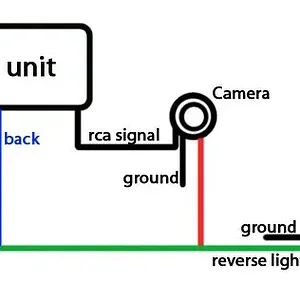
To a few mins today and hooked up the rear camera. Works like a charm. I grounded the black wire from the camera to a factory ground, tapped the 12v signal from the reverse lights to the blue wire labeled "back". Plugged the camera rca cable into the black plug labeled "rear view camera". I...- Keith H.
- Post #102
- Forum: Mazda3 Infotainment
-
K
Red-stripe In-Dash GPS Installed!
Hmm so you just gave the "blue wire" a 12v source and it popped up on the screen. If thats the case then the signal at turns on the backup lights should work.- Keith H.
- Post #97
- Forum: Mazda3 Infotainment
-
K
Red-stripe In-Dash GPS Installed!
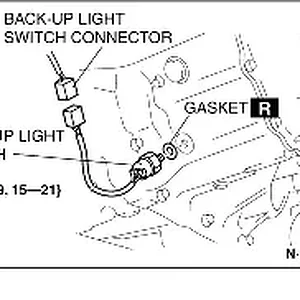
I was replacing the mic with a better one last night and found the "back" labeled blue wire on the head unit. Can you get pics of said connector? Is it the power supply for the reverse light or a different wire coming from the tranny? Also is your 3 a auto or 5 speed? Thanks- Keith H.
- Post #95
- Forum: Mazda3 Infotainment
-
K
new in dash for the 3's
I got the small camera, and when light levels get low it auto tints to a greenish/semi black and white...still has a clear picture as well.- Keith H.
- Post #265
- Forum: Mazda3 Infotainment
-
K
Red-stripe In-Dash GPS Installed!
Here is the link I got it from http://files-upload.com/228560/mazdaiso.ace.html Not sure if its still a working link, my server access is going nuts today here at work.- Keith H.
- Post #85
- Forum: Mazda3 Infotainment
-
K
Red-stripe In-Dash GPS Installed!
I found my mazda3 FSM. Its an .ISO file that it really segmented and broken up. So its real hard to look for stuff in that file. I did find this. Image and if anyone wants the file I can email it to them and they can search the diagrams if they want.- Keith H.
- Post #83
- Forum: Mazda3 Infotainment
-
B3E0918W124.png
- Keith H.
- Media item
- Comments: 0
- Category: Mazda3
-
K
Red-stripe In-Dash GPS Installed!
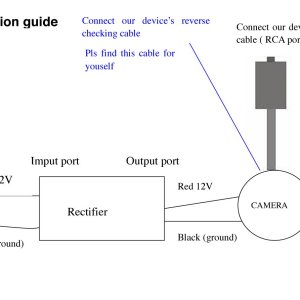
you have to buy their unit, comes with sensors. But your light will be on in the dash if you already have the factory ones and having both is kind of redundant Here is what CA sent me regarding the rear camera. Good luck Zips, be sure to take pics for a proper how to. hehe- Keith H.
- Post #78
- Forum: Mazda3 Infotainment
-
Camera installation guide.jpg
- Keith H.
- Media item
- Comments: 0
- Category: Mazda3
-
K
Red-stripe In-Dash GPS Installed!
Maybe, but this is suppose to be a plug and play unit, and I really don't want to go in and try wiring stuff up unless I know for sure what I am wiring. When you get yours go for it and let us all know, please.- Keith H.
- Post #75
- Forum: Mazda3 Infotainment
-
K
Red-stripe In-Dash GPS Installed!
The camera only comes with a power cable, red for power black for ground and a RCA out (yellow) cable .... its this exact camera.....http://www.caradvanced.com/product_images/a/rear_camera_single_caradvanced__32398.jpg in that pic the red is the power. There are no blue or white wires with...- Keith H.
- Post #73
- Forum: Mazda3 Infotainment
-
K
Red-stripe In-Dash GPS Installed!
yes. Even in AUX mode it new it was a rear camera, even with that function turned off. haha- Keith H.
- Post #71
- Forum: Mazda3 Infotainment
-
K
Red-stripe In-Dash GPS Installed!
Yes. The first time I wired it up I used the signal form the reverse lights and the black "camera in cable". Unless there is a specific wire that needs to be tapped the unit really has no way of knowing if the car is going in reverse or not. I believe it simply looks for a "video in" source...- Keith H.
- Post #69
- Forum: Mazda3 Infotainment