
Search results
-

Before installation.webp
- ADS-B
- Media item
- Comments: 0
- Media category: CX-5
-
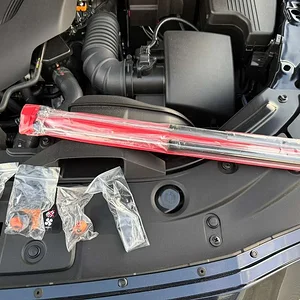
Redline Tuning struts kit.webp
- ADS-B
- Media item
- Comments: 0
- Media category: CX-5
-

Mirror question - passenger side
Go on an official Mazda parts website. Have your VIN number ready and look for that mirror and check it against your VIN number. Better yet, go to your local Mazda dealership at the parts department and ask them to find your mirror part number.- ADS-B
- Post #5
- Forum: CX-5 Ownership & Lifestyle
-
For Sale (Unverified) Navigation SD Card Glitch Fix $20 free shipping
You have to drive the car 62 miles or 100 Km before it pairs with the VIN number. Which I think it's the case here, since the gentleman says in his original post that he drove the car for 3 months. So, I believe that it's not possible to update this SD card in the future, if you are using it...- ADS-B
- Post #4
- Forum: Mazdas247 Marketplace
-
Switched to 5W-30 from 0W-20
One word, acronym rather: C.A.F.E.- ADS-B
- Post #208
- Forum: CX-5 Powertrain & SkyActiv
-
CX-5 NA Oil weight 0w20 or 5w30?
Just because GF-7 shows up, doesn't mean that GF-6 is not good anymore.- ADS-B
- Post #86
- Forum: CX-5 Powertrain & SkyActiv
-
Mazda CX-5 US bound engines programmed differently?
From a warranty perspective, my dealership had no issue with 5W-30 when I brought in my own oil, on my old 2020 CX-5 NA. In my case, at least, it did not void any warranty.- ADS-B
- Post #9
- Forum: CX-5 Powertrain & SkyActiv
-
What have you done to your CX-5 today?
I'd say it's the best looking RAV4 out there. 😆- ADS-B
- Post #9,670
- Forum: CX-5 Ownership & Lifestyle
-
Navigation issue with new CX-5
From the 2024 Mazda CX-5 Navigation Owner's Manual, page 6.- ADS-B
- Post #21
- Forum: CX-5 Tech & Infotainment
-
1765496985161.webp
- ADS-B
- Media item
- Comments: 0
- Media category: CX-5
-
Navigation issue with new CX-5
The 7th generation navigation system does not put exit number on the HUD, just in the "junction view" window, tiny number. On the HUD it says "feeder" something and the arrow. The google thing I have to check it because I rarely use google maps for navigation.- ADS-B
- Post #18
- Forum: CX-5 Tech & Infotainment
-
Beeping sound whilst driving. About 20-30 seconds
OK, so it's the seatbelt, got it. How about placing the rucksack down on the floor, in front of the passenger seat?- ADS-B
- Post #15
- Forum: CX-5 Ownership & Lifestyle
-
Optional CX-5 Accessories Worth Considering?
I am looking for the grille accent/decorative "turbo" trim pieces which I've seen on previous editions but so far no joy. The 2025 grille is different than 2024 model. Anybody had any luck so far?- ADS-B
- Post #20
- Forum: CX-5 Accessories & Utility
-
Beeping sound whilst driving. About 20-30 seconds
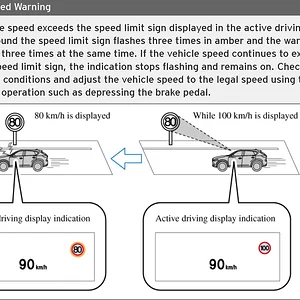
If the sound it's triggered by the weight on one of the seats, you should also have a visual warning on the centre console, above the HVAC control panel. If there's nothing there, maybe the sound is coming from the speed warning.- ADS-B
- Post #13
- Forum: CX-5 Ownership & Lifestyle
-
1765327409784.webp
- ADS-B
- Media item
- Comments: 0
- Media category: CX-5
-
Car washes - safe or not?
I have membership at BlueWave Express Carwash and I'm satisfied with it.- ADS-B
- Post #35
- Forum: CX-5 Accessories & Utility
-
7th Generation Mazda navigation system questions
I actually like it. I find it better looking than the 6th, faster. I use the native system as the main source of navigation, google maps is the back-up.- ADS-B
- Post #7
- Forum: CX-5 Tech & Infotainment
-
7th Generation Mazda navigation system questions
After today's driving and playing more with the navigation, here's another observation. I've noticed that the system does not show the number of the freeway exit on the main map page. You get the arrow and the distance to the exit but no exit number. The only way I can see the exit number is...- ADS-B
- Post #5
- Forum: CX-5 Tech & Infotainment
-
7th Generation Mazda navigation system questions
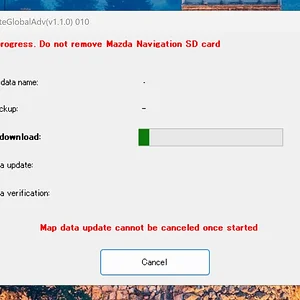
I used Mazda toolbox called MapUpdateGlobalAdv. Update was successful but no back-up. The process lasts a good hour, I’d say.- ADS-B
- Post #4
- Forum: CX-5 Tech & Infotainment
-
643c6d50-f2ce-402d-a8ea-f496d41db5e6.webp
- ADS-B
- Media item
- Comments: 0
- Media category: CX-5